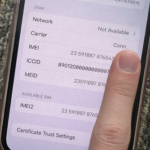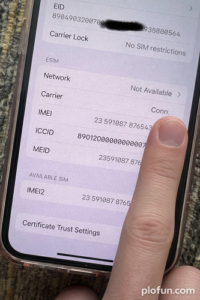
If you’ve ever powered on an iPhone and been hit with the dreaded “Physical SIM for phone not allowed” or “Network unavailable” or “SIM not supported” message because of a blacklisted IMEI, you know how frustrating it is. The phone basically becomes a very expensive iPod. I ran into this exact problem and after some trial and error I found a ridiculously simple workaround that brings the phone back to life in minutes. Best part it cost me nothing, so free!
It works on ANY dual-SIM iPhone (the ones which has both: physical SIM slot + eSIM) as long as IMEI2 is clean.
Quick Prerequisite Check
- Go to Settings → General → About.
- Scroll down and write down IMEI1 and IMEI2.
- Check both on any free IMEI lookup site (imei.info, imeicheck.com or your carrier’s blacklist tool). Some websites charges couple of dollars to provide with result, still worth considering you may get the chance of fixing your iphone.
→ If IMEI2 is clean and only IMEI1 is blacklisted, you’re good to go. This fix will not work if both are blacklisted.
Completely Free (If You Already Use eSIM or after you converted your physical sim to an esim). This is the method I actually recommend if you don’t want to spend even $5:
- First step is to grab any old deactivated physical SIM card (doesn’t matter which carrier, it can be completely dead).
- Insert it into the physical SIM tray (this registers it under the blacklisted IMEI1).
- Second step is to go to Settings → Cellular/Mobile Service → scroll and tap on Add eSIM and add your main line as an eSIM. This activates the esim on the clean IMEI2.
- Once the eSIM is active, simply remove the old deactivated physical SIM from the tray (it does not create any issue if you prefer to keep the physical sim inside iphone).
If you follow the steps in this exact order then removing the old SIM that’s registered under IMEI1 does NOT move your main SIM installed as eSIM from IMEI2 back to IMEI1. Your primary line stays happily on the clean IMEI2 after installation.
- No more “Physical SIM not allowed” or “Network unavailable” errors.
- Full cellular service, calls, texts, and data on your normal number.
- Works on any iPhone model which has both: physical sim and eSIM.
Is literally all it takes to un-brick a blacklisted iPhone when IMEI2 is still good.
If your IMEI2 is clean and you are still having issues email me and will try to help if I can.