
Follow below simple steps:
-
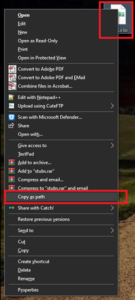
On your keyboard press Shift then right click on the target file. In the right click list of options select Copy as path.
-
Open a Command Prompt window (in Windows search: CMD and then press enter).
-
In command prompt type: del \\?\ and then Ctrl+V (or right-click to paste the copied path) – the result should look something like this: del \\?\”C:\Users\myusername\Downloads\ExampleFileName~1.xlsx“
-
Press Enter to delete the file.
Check the location where file was. The file should now be deleted.
That’s it!